
Exception Handling Class 12 Notes – Important Points
Exception Handling Class 12 Notes – Important Points
What is Error in Programming?
An error or bug in a program is a flaw which prevent our program to execute or generate wrong output. These errors occur due to mistakes made by human while writing a program.
Types of Error
Errors in Python are classified mainly into three types:
1. Syntax Error
Syntax errors are generated when we do not follow the grammatical rules of a programming language. These errors are also known as parsing errors. for example incorrect indentation, leaving bracket or colon(:), misspelling a keyword. Syntax errors are most common type of errors and are easily traceable.
When a syntax error is encountered while working in shell mode, Python displays the name of the error and a small description about the error as shown below.

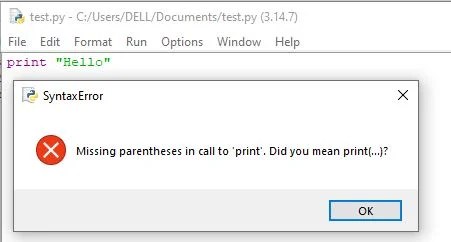
Similarly, when a syntax error is encountered while running a program in script mode, a dialog box specifying the name of the error and a small description about the error is displayed.
2. Logical Error
These error occurs due to incorrect logic of a program. In case of logical error the program run correctly but give wrong output. Logical errors are most difficult to fix. for example
#program to find average of three numbers
n1 = int(input("Enter first number"))
n2 = int(input("Enter second number"))
n3 = int(input("Enter third number"))
avg = n1 + n2 + n3/3
The above program will run correctly but give wrong output as there is one error in the logic of the program. The correct version of the program is given below.
#program to find average of three numbers
n1 = int(input("Enter first number"))
n2 = int(input("Enter second number"))
n3 = int(input("Enter third number"))
avg = (n1 + n2 + n3)/3
3. Run Time Error:
A runtime error occurs when Python interpreter encounters an unexpected condition during execution of program. They can cause the program to crash. Common example include dividing by zero, trying to open file that does not exist.
>>> 10/0
The above code will return a run time error
What is Exception Handling?
An exception is an error that occurs during the execution of a program. Python provides a mechanism to handle such exceptions and prevent the program from terminating. This mechanism is called Exception Handling.
What is the need for Exception Handling?
Exception handling is being used not only in Python programming but in most programming languages like C++, Java, Ruby, etc. It is a useful technique that helps in capturing runtime errors and handling them so as to avoid the program getting crashed.
Built-in Exceptions
Commonly occurring exceptions are usually defined in the compiler/interpreter. These are called built-in exceptions. Python’s standard library is an extensive collection of built-in exceptions that deals with the commonly occurring errors (exceptions). Some of the commonly occurring built-in exceptions that can be raised in Python are given below.
| Name of the Built-in Exception | Explanation |
| SyntaxError | It is raised when there is an error in the syntax of the Python code. |
| ValueError | It is raised when an operation receives an argument that has the right data type but mismatched values |
| IOError | It is raised when the file specified in a program statement cannot be opened. |
| ImportError | It is raised when the requested module definition is not found. |
| IndexError | It is raised when the index or subscript in a sequence is out of range |
| NameError | It is raised when a local or global variable name is not defined. |
| TypeError | It is raised when an operator is supplied with a value of incorrect data type. |
| IndentationError | It is raised due to incorrect indentation in the program code |
Raising Exceptions
The raise statement is used to manually raise or generate an exception in a Python program.
Syntax
raiseexception_name(optional_argument)
- exception_name is the type of exception to be raised.
- The optional argument is usually an error message displayed when the exception occurs.
How does raise work?
Python automatically raises an exception when it detects an error during program execution. However, sometimes a programmer may want to raise an exception manually when a particular condition is considered invalid.
When an exception is raised, the normal flow of the program is interrupted. The program then looks for an appropriate exception handler to handle that exception. If no handler is available, Python displays an error message and stops the program.
Example
age = int(input("Enter your age: "))

if age < 0:
    raise ValueError("Age cannot be negative")

print("Your age is:", age)
print("You can continue with the program.")
Output 1: When a valid age is entered
Enter your age: 20
Your age is: 20
You can continue with the program.
Output 2: When an invalid age is entered
Enter your age: -5
ValueError: Age cannot be negative
Explanation
Here, a negative age is considered invalid by the programmer. Python itself does not consider -5 an error because it is a valid integer. Therefore, the programmer uses:
raiseValueError("Age cannot be negative")to manually raise a ValueError.
Once the exception is raised, the statements after raise are not executed unless the exception is handled using exception handling.
In simple words, the raise statement is used when a programmer wants to manually generate an exception for an invalid condition in a program.
The assert Statement
An assert statement in Python is used to test an expression in the program code. If the result after testing comes false, then the exception is raised. The syntax for assert statement is:
assert Expression[,arguments]
If the expression given after assert statement is false, an AssertionError exception is raised which can be handled like any other exception. for example
print("use of assert statement")
def negativecheck(number):
        assert(number>=0), "OOPS... Negative Number"
        print(number*number)
print (negativecheck(100))
print (negativecheck(-350))
on passing a negative value (-350) as an argument, it results in AssertionError and displays the message “OOPS…….. Negative Number”
Process of Handling Exception
When an error occurs, Python interpreter creates an object called the exception object. This object contains information about the error. The object is handed over to the runtime system so that it can find an appropriate code to handle this particular exception. This process of creating an exception object and handing it over to the runtime system is called throwing an exception.
When a suitable handler is found , it is executed by the runtime process. This process of executing a suitable handler is known as catching the exception.
Catching Exceptions
An exception is said to be caught when a code that is designed to handle a particular exception is executed. Exceptions, if any, are caught in the try block and handled in the except block. for example
try:
       numerator=50
       denom=int(input("Enter the denominator"))
       quotient=(numerator/denom)
       print(quotient)
       print ("Division performed successfully")
except ZeroDivisionError:
       print ("Denominator as ZERO.... not allowed")
print(“OUTSIDE try..except block”)
If the user enters any non-zero value as denominator, the quotient will be displayed along with the message “Division performed successfully”. The except clause will be skipped in this case. So, the next statement after the try…..except block is executed.

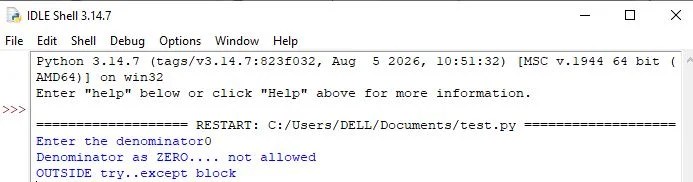
However, if the user enters the value of denom as zero (0), then the execution of the try block will stop. The control will shift to the except block and the message “Denominator as Zero…. not allowed” will be displayed, as below:
Multiple except block
Sometimes, a single piece of code might be suspected to have more than one type of error. For handling such situations, we can have multiple except blocks for a single try block as shown below
print ("Handling multiple exceptions")
try:
      numerator=50
      denom=int(input("Enter the denominator: "))
      print (numerator/denom)
      print ("Division performed successfully")
except ZeroDivisionError:
      print ("Denominator as ZERO is not allowed")
except ValueError:
      print ("Only INTEGERS should be entered")
In the code, two types of exceptions (ZeroDivisionError and ValueError) are handled using two except blocks for a single try block. When an exception is raised, a search for the matching except block is made till it is handled. If no match is found, then the program terminates.
If an exception is raised for which no handler is created by the programmer, then such an exception can be handled by adding an except clause without specifying any exception. This except clause should be added as the last clause of the try……..except block.
Use of except without specifying an exception
try:
     numerator=50
     denom=int(input("Enter the denominator"))
     quotient=(numerator/denom)
     print ("Division performed successfully")
except ValueError:
     print ("Only INTEGERS should be entered")
except:
     print(" OOPS.....SOME EXCEPTION RAISED")
try…except…else clause
We can put an optional else clause along with the try…except clause. If there is no error then none of the except blocks will be executed. In this case, the statements inside the else clause will be executed.
try:
     numerator=50
     denom=int(input("Enter the denominator: "))
     quotient=(numerator/denom)
     print ("Division performed successfully")
except ZeroDivisionError:
     print ("Denominator as ZERO is not allowed")
except ValueError:
     print ("Only INTEGERS should be entered")
else:
     print ("The result of division operation is ", quotient)
OUTPUT:

Finally Clause
The statements inside the finally block are always executed regardless of whether an exception has occurred in the try block or not. This block should always be placed at the end of try clause, after all except blocks and the else block.
try:
     numerator=50
     denom=int(input("Enter the denominator: "))
     quotient=(numerator/denom)
     print ("Division performed successfully")
except ZeroDivisionError:
     print ("Denominator as ZERO is not allowed")
except ValueError:
     print ("Only INTEGERS should be entered")
else:
     print ("The result of division operation is ", quotient)
finally:
     print ("OVER AND OUT")
In the above program, the message “OVER AND OUT” will be displayed irrespective of whether an exception is raised or not.
Recovering and continuing with finally clause
If the exception is not handled by any of the except clauses, then it is re-raised after the execution of the finally block.
try:
     numerator=50
     denom=int(input("Enter the denominator"))
     quotient=(numerator/denom)
     print ("Division performed successfully")
except ZeroDivisionError:
     print ("Denominator as ZERO is not allowed")
else:
     print ("The result of division operation is ", quotient)
finally:
     print ("OVER AND OUT")
After execution of finally block, Python transfers the control to a previously entered try or to the next higher level default exception handler. In such a case, the statements following the finally block is executed.
Five minute Revision Sheet(Click to Download)

SUMMARY

1. Syntax errors or parsing errors are detected when we have not followed the rules of the particular programming language while writing a program

2. When syntax error is encountered, Python displays the name of the error and a small description about the error.

3. The execution of the program will start only after the syntax error is rectified

4. An exception is a Python object that represents an error.

5. Syntax errors are also handled as exceptions.

6. The exception needs to be handled by the programmer so that the program does not terminate abruptly.

7. When an exception occurs during execution of a program and there is a built-in exception defined for that, the error message written in that exception is displayed. The programmer then has to take appropriate action and handle it.

8. Some of the commonly occurring built-in exceptions are SyntaxError, ValueError, IOError, KeyboardInterrupt, ImportError, EOFError, ZeroDivisionError, IndexError, NameError, IndentationError, TypeError,and OverFlowerror.

9. When an error is encountered in a program, Python interpreter raises or throws an exception.

10. Exception Handlers are the codes that are designed to execute when a specific exception is raised.

11. Raising an exception involves interrupting the normal flow of the program execution and jumping to the exception handler.

12. Raise and assert statements are used to raise exceptions.

13. The process of exception handling involves writing additional code to give proper messages or instructions to the user. This prevents the program from crashing abruptly. The additional code is known as an exception handler.

14. An exception is said to be caught when a code that is designed to handle a particular exception is executed.
Disclaimer : I tried to give you the correct “Exception Handling Class 12 Notes“ , but if you feel that there is/are mistakes in “Exception Handling Class 12 Notes“ given above, you can directly contact me at csiplearninghub@gmail.com. The above “Exception Handling Class 12 Notes“ are created for practice of students and the entire content is from NCERT Book. Screenshots used in above article is taken from NCERT Book.
MCQ of Computer Science Chapter Wise
2. Flow of Control (Loop and Conditional statement)
3. 140+ MCQ on Introduction to Python
4. 120 MCQ on String in Python
7. 100+ MCQ on Flow of Control in Python
8. 60+ MCQ on Dictionary in Python